The Practice Room / The Desktop Apps / Episode 30
Where the ChatGPT Library went
The Library was not deleted, it was renamed to Space, and a Create button turned it from somewhere you keep things into somewhere you make them.
If you opened ChatGPT this week and went looking for your Library, it was not there. Nothing was deleted. It was renamed, and the new name is Space.
ChatGPT tells you so itself the first time you look, on a small card that says Library is now Space. If you missed the card, which is easy to do, the rename looks exactly like something going missing.
Where to find it
Look down the left side of the window and you should see Space. I am deliberately not telling you which position it sits in, because that is the kind of detail that is true this week and wrong next month, and it is already different between the browser, the desktop app and your phone. Look for the word.
Everything that was in the Library is still in it
Your pages, your slides, your images, and every file you have ever uploaded. If you had it before, it is in there now. This is worth saying plainly because the first reaction to a missing menu item is usually that something has been lost.
What actually changed
The Library was storage. You went to it to find something you had already made. Space is somewhere you make things, and the difference is one button.
There is a Create button on that screen. Open it and it offers to make you a page, a set of slides, a site, an image, a folder, or a whole space of its own.
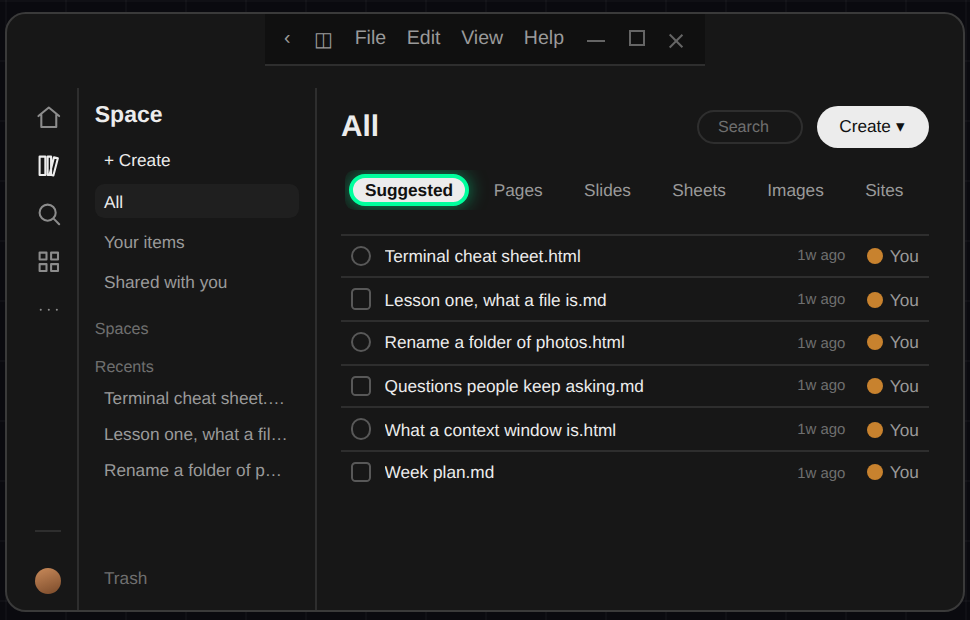
What a page is, and why it matters if you work alone
A page is a document you build together with ChatGPT and can then invite somebody into. They read it and leave a comment on it, the way they would on a shared document anywhere else.
The part that is genuinely new is what happens next. You can tag ChatGPT inside that comment and ask it to make the change. The person who commented does not need to know how to write the instruction, and you do not have to translate their note into a prompt yourself.
A page can also keep itself up to date from the apps you have already connected. If the page is this month's numbers, it stays this month's numbers without you opening it.
One gap, so you do not go hunting
Sheet is listed on that Create menu, and underneath it says coming soon. There is no spreadsheet inside Space yet. If a spreadsheet is the thing you wanted, that is the one to wait for.
What sharing does and does not hand over
Sharing a page does not give anybody your chats, and it does not give them what ChatGPT remembers about you. It gives them the page. That distinction is the one people ask about before they send anything to a client, and the answer is the reassuring one.
What to do with it this week
Open Space once and look at what is already in there, because if you have used ChatGPT for any length of time it will not be empty. Then press Create and make one page out of something you were going to write in a document anyway. The point is not the page. It is finding out that the place you think and the place the work ends up are now the same place.
What she says in the film
If you opened ChatGPT this week and your Library was gone, you did not lose anything. It was renamed.
It is called Space now, and ChatGPT says so itself the first time you look: Library is now Space.
Look down the left side of the window and you should see Space.
Everything that was in the Library is still in there. Your pages, your slides, your images, and every file you have ever uploaded.
What changed is that it stopped being a shelf. It is a place you make things in now.
There is a row of tabs along it: Suggested, Pages, Slides, Sheets, Images and Sites.
And there is a button called Create, which is the part worth pressing.
It offers you a page, a set of slides, a site, an image, a folder, or a whole space of its own.
A page is a document you build with ChatGPT and then invite somebody into. They can leave a comment on it, and you can tag ChatGPT in that comment and ask it to make the change.
You can also set a page to keep itself up to date from the apps you have already connected.
One thing to know before you go hunting. Sheet is on that menu, and underneath it says coming soon, so there is no spreadsheet in there yet.
And sharing a page does not hand anybody your chats or what it remembers about you. It hands them the page.
It is on the web, on the desktop app and on your phone. It reached Plus accounts this week, and the higher plans have had it since the autumn.
Subscribe.
No permission required.
That is the last episode of The Desktop Apps so far. New ones land as they are filmed.
Book a session and we do it together on a call.
Book an hourAsk what did not make sense
Comments go through our own form and are read before they appear. Links are not allowed; describe it in words.
More from The Desktop Apps.

Claude Desktop: Chat vs Code, what actually changes
This is the Claude desktop app.
Where the settings are in Claude Desktop
You opened Claude, and you cannot find the settings.

Does Claude run on your computer?
Give the chat a job, and it does not run on your computer at all. It runs on a computer somewhere else, one th…
Get the next walkthrough.
One email when something goes up. The argument, the film and the term, nothing else. One click to leave.
Have a question now? Ask Mstimaj, she knows the archive.