The Practice Room / The Terminal with Claude Code / Episode 5
How to use Claude Code in the terminal, for the first time
Two films ago we installed it. Last time we made it show its plan. Today it makes something.
The first real job
You installed it, and you made it show you a plan. This is the one where it makes something that is still there after you close the window.
The job is small on purpose. A folder and a document inside it, small enough that you can check every part of what it did.
Do it yourself
- Open the Command Prompt. It starts you in your own user folder.
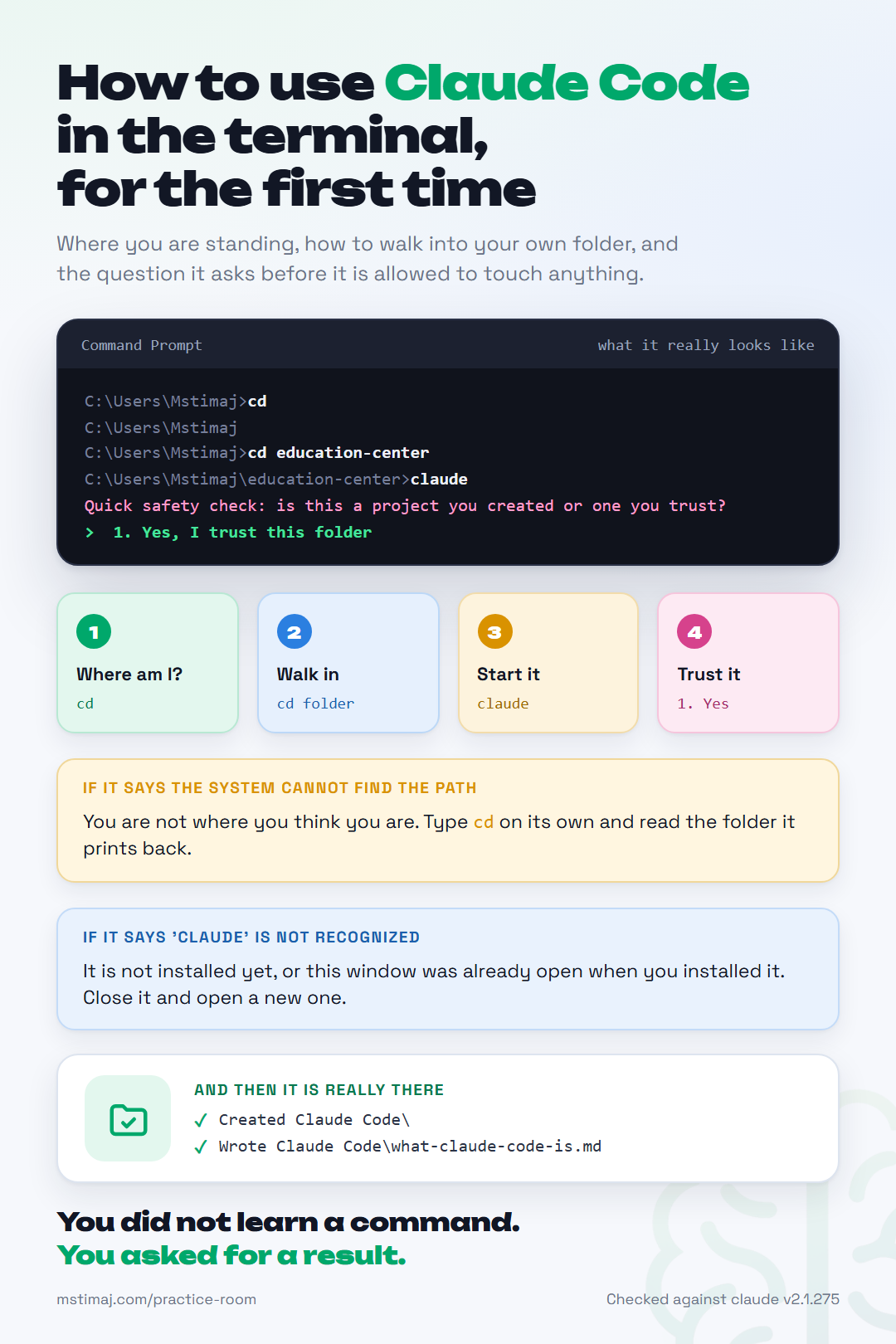
- Type cd on its own. It prints the folder you are standing in.
- Type cd education-center, the folder you built in the folders lesson.
- Type claude and press enter.
- It asks whether you trust this folder. You made it, so yes.
- Ask for what you want in one sentence: Make a folder called Claude Code, and write me a one page document inside it that explains what you are.
- It names the folder it is about to make and the file it is about to write, then stops and waits.
- Say yes, and watch it work.
- Open education-center in your file manager. The folder is there, with a document you can read.
Where you are standing is the whole job
It works on the folder it was started in and nothing else. That is the whole safety model.
Why it asks about trusting the folder
The first time Claude Code opens in any folder it asks whether you trust it. You are not being asked whether you trust Claude. You are being asked about the contents of that folder, because it is about to read them.
For a folder you built yourself the answer is easy. For a folder you downloaded from somewhere, think about it for a second longer.
Where you are standing is the whole job
Claude Code works inside the folder you opened it in. That is its world for this session. Open it in the wrong room and it does the right work in the wrong place.
This is why the lesson starts with cd rather than with the assistant. Knowing where you are standing is not a preliminary. It is the thing that makes the rest safe.
Check yourself
Why type cd on its own before you start?
It prints the folder you are standing in. Claude Code works in that folder, so you want to be certain of it first.
It asked whether you trust this folder. What is the question really about?
Whether you trust what is inside the folder, because it is about to read those files.
It described a folder and a file, then stopped. Is something wrong?
No. It is waiting for you to say yes. It tells you what it is about to do before it does it.
Where did the document actually go?
Into a real folder on your computer, inside the folder you were standing in. You can open it in the file manager like anything else.
When it goes wrong
No such file or directory. The folder you named is not inside the folder you are standing in. Type cd on its own to see where you are.
It made the folder somewhere unexpected. You opened Claude Code in a different folder than you thought. Close it, cd to the right one, open it again.
Nothing seemed to happen when you said yes. Give it a moment. It writes while you watch, and a one page document is quick without being instant.
Words used here
AI agent • Terminal • What Claude Code is
Go deeper
Claude Academy is free and covers the same ground at length, if one job is not enough.
What she says in the film
Two films ago we installed it. Last time we made it show its plan. Today it makes something.
Open the Command Prompt. It starts you in your own user folder.
Type c d on its own and press enter. It prints the folder you are standing in.
Now type c d, space, education dash center. That is the folder you made in the folders lesson.
Type claude, press enter.
The first time in a folder, it asks whether you trust it. You made this one, so yes.
It opens its own screen, with the model it is running and the folder you are standing in.
Now ask for what you want, in one sentence. Watch the box grow as you type.
Make a folder called Claude Code, and write me a one page document inside it that explains what you are.
It tells you the folder it is about to make and the file it is about to write. Then it stops and waits.
You say yes. It makes the folder and writes the file while you watch.
Open education dash center. The Claude Code folder is sitting there, with a document inside you can read.
That is your Claude tip for today.
No permission required.
Book a session and we do it together on a call.
Book an hourAsk what did not make sense
Comments go through our own form and are read before they appear. Links are not allowed; describe it in words.
More from The Terminal with Claude Code.
Install Claude Code in one line
Claude Code is an assistant that can read and edit the files on your computer.

Claude Code plan mode, and the shift+tab shortcut
Last time we installed Claude Code. Before you let it change anything, there is one thing worth knowing.

One window, one colour
Three Claude Code windows look identical and the only difference is a folder path. One command gives each one…
Get the next walkthrough.
One email when something goes up. The argument, the film and the term, nothing else. One click to leave.
Have a question now? Ask Mstimaj, she knows the archive.