The Practice Room / The Terminal with Claude Code / Episode 6
Claude Code plan mode, and the shift+tab shortcut
Last time we installed Claude Code. Before you let it change anything, there is one thing worth knowing.
Look before it leaps
Claude Code can change the files on your computer. Plan mode is how you see what it intends to do before a single file moves.
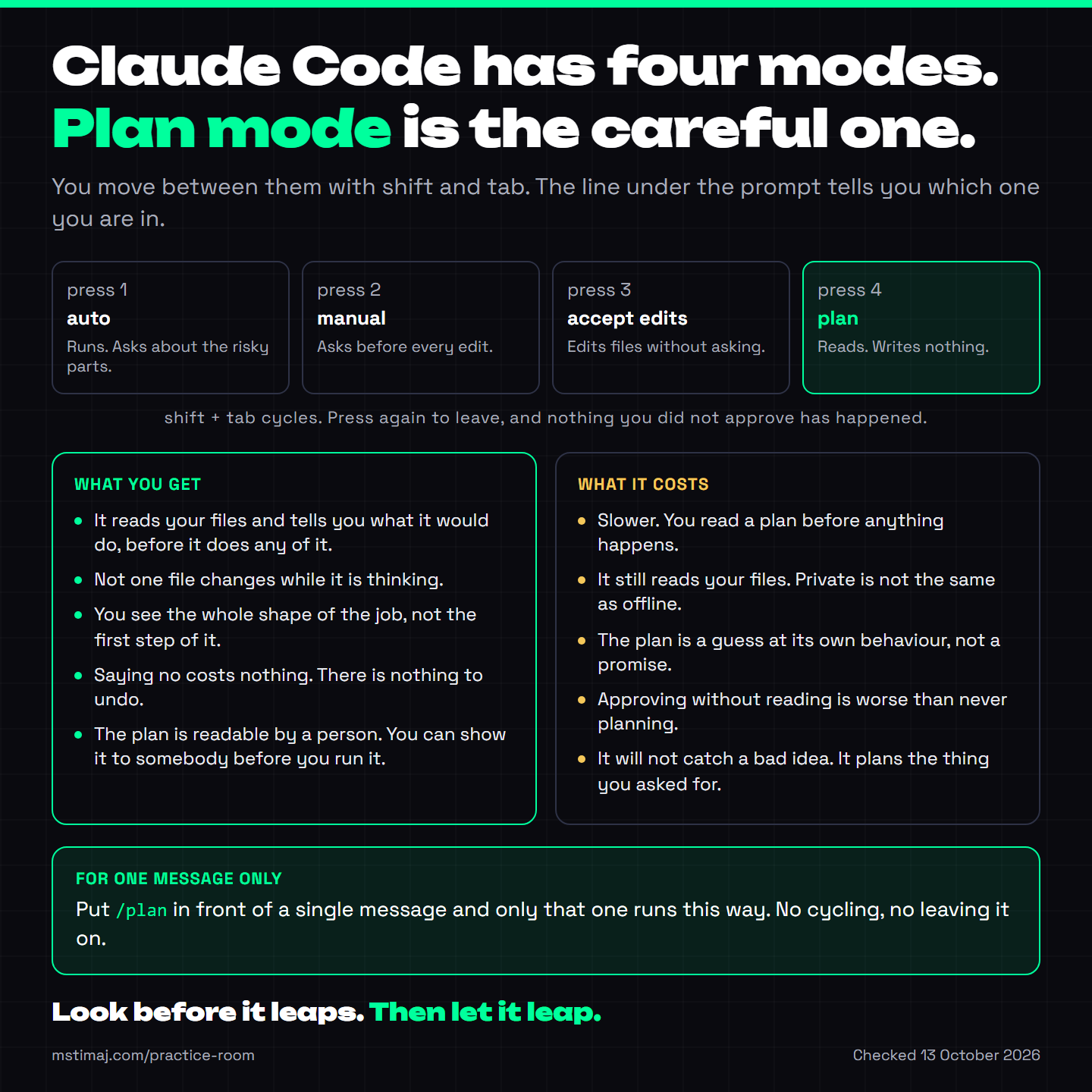
It has four modes and you move between them with one shortcut. None of this is buried in a settings screen. It is a key you press.
The four modes
Press shift and tab together and the line under the prompt changes. Press again and it changes again.
- Auto. It decides and acts.
- Manual. It asks you before each change.
- Accept edits. It edits files without stopping to ask.
- Plan. It reads, works out what it would do, and writes you a plan. It changes nothing while it is thinking.
Shift and tab cycles these four
None of this is in a settings screen. It is a key you press.
Do it yourself
- Open Claude Code in a folder you built yourself.
- Press shift and tab until the line reads plan mode on.
- Ask for something real. A tidy-up, a rename, a document.
- Watch it look around the folder and then hand you the plan instead of the result.
- Read it. If it is right, let it run. If it is wrong, say so, and nothing has happened yet.
- Press shift and tab again to leave without approving anything.
The one-message shortcut
If you do not want to change mode at all, put /plan in front of a single message. Only that message runs this way, and everything after it behaves normally.
This is the version worth building a habit around, because it costs you nothing on the messages where you do not need it.
Check yourself
Which two keys move you between modes?
Shift and tab, pressed together. Each press moves you one mode along.
What makes plan mode different from the other three?
It changes no file while it is working. It reads, works out what it would do, and hands you the plan instead.
You read the plan and it is wrong. What has already happened to your files?
Nothing. That is the point. You say what is wrong and it plans again.
You want one careful message, not a whole careful session. What do you type?
/plan at the front of that message.
When it goes wrong
Shift and tab does nothing. You are in your ordinary terminal rather than inside Claude Code. The shortcut works once Claude Code is open and its prompt is waiting.
/plan ran as ordinary text. A slash command has to be the first thing in the message. Put anything in front of it and it is just words.
It planned, then changed files anyway. You approved the plan. Approving is the step that releases it.
Words used here
AI agent • What Claude Code is • Terminal
Go deeper
Anthropic documents every mode and shortcut in the Claude Code documentation, worth a look once the habit is in your hands.
What she says in the film
Last time we installed Claude Code. Before you let it change anything, there is one thing worth knowing.
It has four modes, and you move between them with shift and tab.
Press shift and tab. The line under the prompt changes. Auto mode on.
Press again. Manual mode on.
Again. Accept edits on.
Again. Plan mode on.
Plan mode is the careful one. It reads your files, works out what it would do, and writes you a plan. It does not change a single file while it is thinking.
So ask it for something. Watch it look around your folder, and then hand you the plan instead of the result.
You read the plan. If it is right, you let it run. If it is wrong, you say so, and nothing has happened yet.
There is a shortcut. Put slash plan in front of one message, and only that message runs this way.
Press shift and tab again to leave, without approving anything.
That is the whole habit. Look before it leaps.
That is your Claude tip for today.
No permission required.
Book a session and we do it together on a call.
Book an hourAsk what did not make sense
Comments go through our own form and are read before they appear. Links are not allowed; describe it in words.
More from The Terminal with Claude Code.

Install Claude Code in one line
Claude Code is an assistant that can read and edit the files on your computer.
How to use Claude Code in the terminal, for the first time
Two films ago we installed it. Last time we made it show its plan. Today it makes something.

One window, one colour
Three Claude Code windows look identical and the only difference is a folder path. One command gives each one…

Get the next walkthrough.
One email when something goes up. The argument, the film and the term, nothing else. One click to leave.
Have a question now? Ask Mstimaj, she knows the archive.